Frequently Asked Questions:
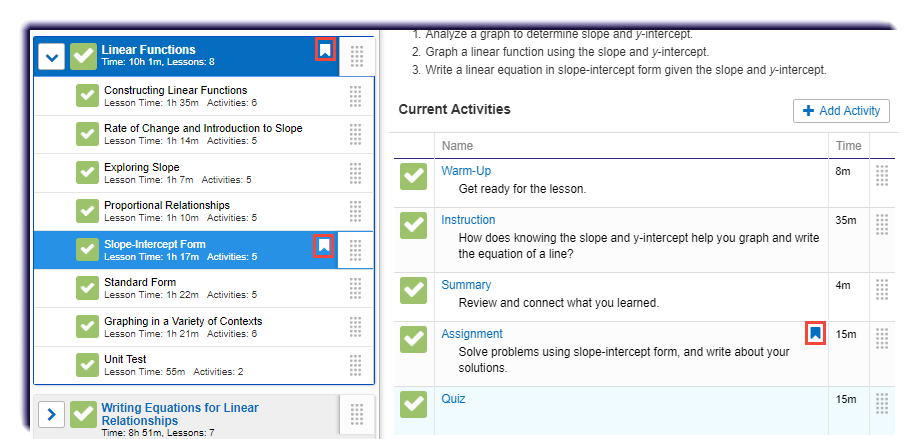
A white flag displays on the current unit and lesson of the student whose course is already in-flight.
A blue flag displays on the current activity of the student whose course is already in-flight.
No. Any score earned from a removed activity will no longer count toward a student's overall grade. If the activity is customized back in to the course, any score earned from that activity will count toward a student's overall grade.
The customizing tool has many options. This page shows the main functions of the tool. Simply click on one to learn more about it.
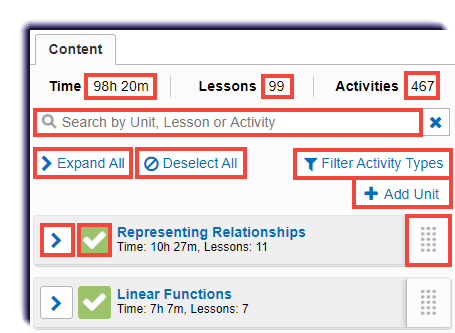
| Action | Description | Available for an In-Flight, Course-Level course |
|---|---|---|
| Time | The total estimated time of the course. This is dynamic and will change when alterations are made to the course. |  |
| Lessons | The total lessons in the course. This is dynamic and will change when alterations are made to the course. | |
| Activities | The total activities in the course. This is dynamic and will change when alterations are made to the course. | |
| Search Bar | Type a specific Unit, Lesson, or Activity into the box. | |
| Expand All | Opens all the Units in the course to see the lessons and tests housed within each one. | |
| Deselect All | Unchecks all the current unit, lessons, and activities | |
| Filter Activity Types | Allows you to take out the each activity type throughout the course. | |
| Add a Unit | Allows you to create your own unit. | |
| Dropdown Arrow | Opens up the unit for you to see what lessons and tests are in it. | |
| Checkmark Box | Informs you that the Unit, Lesson, or Activity is currently active in the course. | |
| Feature that allows you to move the Unit, Lesson, or Activity. |
Note
When customizing a student's course that is already in-flight, a white flag displays on the current unit and lesson of the student. The blue flag appears on the current activity. Note that if an activity is removed from the course that a student has already completed, the score will not count toward the student's overall grade. If the activity is then placed back into the course, the earned score is returned and will count toward the student's overall grade.